SSAI Tracking: Server-Side vs Client-Side Beacons
Server-side SSAI beacons fire when segments are fetched, not watched. How server and client tracking differ, and three problems both must solve.
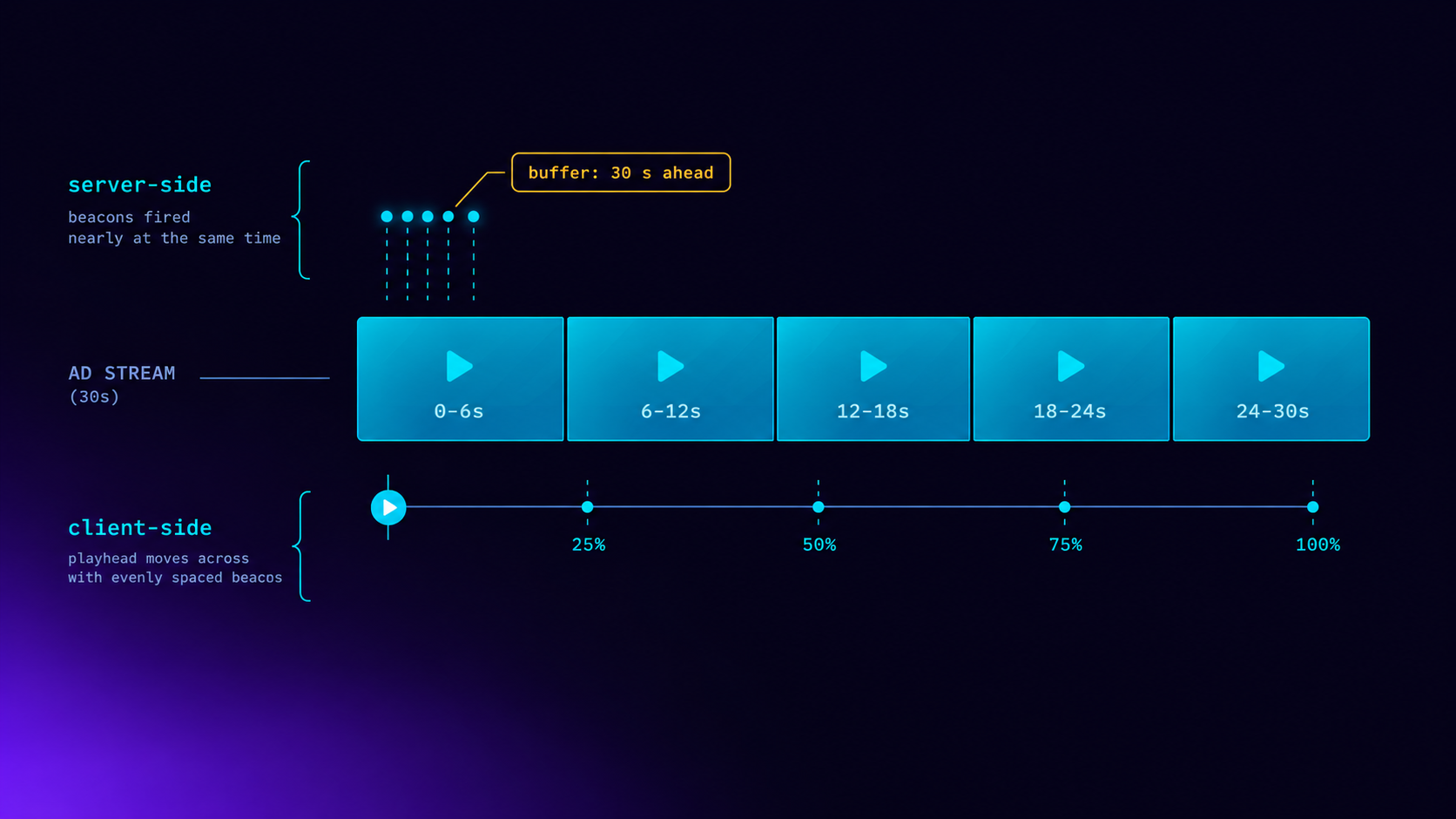
In server-side ad insertion there are two ways to report that an ad played. In server-side tracking, the stitcher fires the impression and quartile beacons itself, when the player requests the ad's video segments. In client-side tracking, the stitcher hands the player a list of ads and their beacon URLs, and the player fires each one when its playhead actually reaches that point. Server-side needs no player work and runs on every device. But it measures fetching, not watching, and a player that buffers ahead can request a whole 30-second ad, completion beacon included, in its first few seconds. Client-side measures playback and supports ad UI such as countdowns and click-through. In exchange, every player you support has to implement it.
Whichever mode you choose, three problems remain: counting each event exactly once, telling the ad server which device and viewer it was, and proving the beacon is genuine. And one rule overrides everything else: a session uses one mode or the other, never both.
I built both modes into the LtvAdx SSAI service in October. This post explains how each works, where each is inaccurate, and how to choose.
What a beacon is, and who fires it without SSAI
A VAST response does not just say which video to play. It lists tracking URLs for each moment that matters: the impression, the start, the first quartile, the midpoint, the third quartile, completion, clicks and errors. Each URL is a beacon. Fetching it is how the ad server, and any measurement vendor the advertiser uses, learns that the moment happened.
With client-side ad insertion, the player does everything. It requests the VAST, plays the ad and fires each beacon at the matching point on its own clock. The beacons come from the viewer's device, carrying its IP address and user agent, which is what verification and fraud detection expect. The VAST 4.2 guide for publishers covers the event list in detail.
SSAI moves the ad into the video stream itself. The player receives one continuous stream in which the ad segments sit between content segments, and it often has no idea which parts are ads. Someone still has to fire the beacons. That is the choice this post is about. The SSAI explainer covers the stitching side.
How server-side tracking works
In server-side mode, the stitcher rewrites the playlist so that ad segment URLs point back at itself. When the player requests an ad segment, the stitcher records the request, fires whatever beacons belong to that segment, and redirects the player to the actual media.
So the question becomes: which beacon belongs to which segment? The natural mapping, and the one LtvAdx uses, is that each event is attached to the segment containing its moment. For a 30-second ad cut into 6-second segments:
Segment   Covers      Beacons fired when the segment is requested
0         0–6 s       impression, start
1         6–12 s      firstQuartile   (7.5 s)
2         12–18 s     midpoint        (15 s)
3         18–24 s     thirdQuartile   (22.5 s)
4         24–30 s     complete        (fired on request of the last segment)
That is tidy, and it requires nothing from the player. Any device that can play an HLS or DASH stream generates beacons simply by playing it: smart TVs, streaming sticks, set-top boxes, game consoles, web players. For a FAST channel distributed to many platforms, that is a very large advantage.
AWS's documentation for its own stitcher describes server-side tracking the same way: events fire on the player's actual segment requests. It is the industry's default for the same reason it is ours.
The catch: requesting is not watching
Players do not request segments at the moment they display them. They request them ahead of time, to build a buffer that protects against network hiccups. How far ahead depends on the player and its settings. The popular web player hls.js, for example, aims by default to buffer up to 30 seconds ahead, according to its configuration documentation.
Put that next to the table above. A player that buffers 30 seconds ahead can request all five segments of a 30-second ad within the first few seconds of it starting to play. Every beacon, completion included, may fire before the viewer has seen more than the opening frames. If they switch channels at second four, the ad server has already been told the ad completed.
Three practical consequences follow.
Server-side quartiles describe the network, not the viewer. On a fast connection with a deep buffer they arrive almost together. On a slow connection they arrive spread out. Neither tells you much about attention.
Server-side completion rates run high. A completion rate in the high nineties from server-side tracking says the player fetched the ads. It does not say viewers watched them. The VCR vs completion rate post explains why buyers should ask which one they are looking at.
Precision is bounded by segment length. Even without buffering, an event can only be as precise as the segment that carries it. With 6-second segments, a quartile is placed to within 6 seconds. Shorter segments, 2 seconds being common for live streams, make the mapping finer but do nothing about read-ahead.
None of this makes server-side tracking wrong. A segment request is real evidence that a real player on a real connection was receiving the ad. It is a weaker signal than playback, and it should be labelled as such.
How client-side tracking works
In client-side mode the stitcher still builds the stream, but it fires nothing. Instead it exposes a tracking API: for this session, here are the ad breaks, the ads in each, their start times on the stream timeline, and their beacon URLs. The player polls that API, matches its playhead against the ad timeline, and fires each beacon when playback actually crosses the point.
In LtvAdx the tracking API lives at GET /ssai/sessions/{sid}/tracking and returns avails, then ads, then tracking events: impression, start, the three quartiles and completion, plus click-through and click tracking. Its shape follows the convention the larger stitchers use, so players already integrated with one need little change. AWS documents its equivalent as client-side ad tracking.
Because the player knows where the ads are, client-side mode also enables things server-side mode cannot: a countdown, a clickable "learn more" button, skippable ads, preventing a viewer from scrubbing through an ad, and companion banners. If you need any of those, you need client-side mode, whatever you decide about measurement.
The cost is integration. Every player on every platform has to fetch the tracking data, follow the timeline and fire beacons reliably, including when the viewer pauses, seeks or loses connection. A FAST channel on eight platforms needs eight correct implementations. Beacons fired from devices can also be lost to flaky networks or blocked by network-level filters.
Side by side
                          Server-side                   Client-side
──────────────────────────────────────────────────────────────────────────────────
Fired by                  The stitcher                  The player
Fired when                Ad segment is requested       Playhead crosses the point
Measures                  Delivery to the player        Playback in the player
Player work needed        None                          Fetch timeline, fire beacons
Works on every device     Yes                           Only where implemented
Ad UI (skip, countdown,   No                            Yes
  click-through)
Precision                 One segment, minus buffering  Sub-second
Risk of overcounting      Read-ahead counts unwatched   Low
Risk of undercounting     Low                           Lost or blocked beacons
Source IP seen by vendor  Stitcher's, unless forwarded  Viewer's device
Problem 1: counting each event exactly once
Both modes generate duplicate signals in ordinary operation. In server-side mode, a player retries a failed segment request, switches bitrate mid-ad and requests the same segment at a different quality, or re-requests a segment after seeking backwards. In client-side mode, a player retries a beacon that timed out, or fires twice after a pause and resume.
If each of those counts, impressions and quartiles inflate. The fix is to give every individual ad decision its own identifier and key every event on it. In LtvAdx each ad in a pod carries its own request id, the same kind used for a client-side VAST request. The impression for that id can be recorded once, the first quartile once, and so on, however many times the signal arrives. Billing, frequency capping and invalid-traffic checks hang off the same record, so a duplicate beacon cannot bill twice or count twice towards a household's cap.
A useful side effect is that SSAI and client-side VAST share one pipeline. An impression is an impression, whether a segment request or a player produced it, and the reporting does not have to reconcile two systems.
Problem 2: whose device was it?
In server-side mode the beacons come from the stitcher's servers. To the ad server and to any verification vendor, thousands of impressions arriving from a handful of data-centre IP addresses look exactly like fraud. And targeting by location, frequency capping by household and invalid-traffic detection all need the viewer's address, not the stitcher's.
The IAB's VAST guidelines address this. From VAST 4.1, stitchers are expected to pass the viewer's details on in HTTP headers, X-Device-IP and X-Device-User-Agent, when they call the ad server and fire beacons. See the VAST standard for the full text.
The other half of the problem gets less attention: those headers are claims, and anyone can send them. An ad server that believes every X-Device-IP header lets any caller choose its own location and its own household. We learned that lesson on a related header: until early October our ad server accepted a country header from any client, which meant anyone could pick their own country. That is now fixed, and the same principle applies here. LtvAdx believes forwarded device details only from partner networks that have been checked, one at a time, and the default list is empty. Everyone else is judged by the address they actually connect from. The IP geotargeting post covers why the right-most untrusted address is the one to use.
In LtvAdx's own SSAI the problem is smaller, because the player connects to our stitcher directly. The stitcher sees the viewer's real address on every segment request and records it with the beacon.
Problem 3: proving the beacon is genuine
Client-side mode means beacon URLs are handed to devices, and anything handed to a device can be copied. If a beacon URL can be fetched by anyone, a script can generate impressions for ads nobody saw.
The defence is to sign every tracking URL: the URL carries a signature, computed by the ad server, covering the ad decision, the event and the parameters. A beacon with a missing or altered signature is recorded, because it is useful evidence of tampering, but it never produces an impression, a quartile or a charge. LtvAdx signs client-side SSAI tracking URLs exactly the way it signs ordinary VAST tracking, so there is one rule and one implementation. Signed URLs do not stop someone replaying a genuine beacon, which is what the de-duplication in problem 1 is for. The two together close the gap.
Server-side mode has an equivalent concern. Ad segment URLs in the stitched playlist are signed too, so a request for a segment that was never part of this session's plan does not fire anything.
Fraud through SSAI is a well-documented problem: fake stitching servers that generate requests with no player behind them. The SSAI fraud and IVT post covers the patterns.
The rule that matters most: never both
It is tempting to run both modes at once, server-side for reliability and client-side for precision. Do not. If the stitcher fires an impression on the segment request and the player fires the same impression from the tracking API, every ad counts twice in any system that does not de-duplicate across both sources, and many measurement vendors do not.
In LtvAdx the reporting mode is set once, when the session is created, as SERVER or CLIENT. Server mode is the default. In client mode, segment requests fire nothing and the tracking API carries signed beacon URLs. In server mode, the tracking API still describes the ads, so the player can show an "Ad" badge, but its beacon lists are empty. Any other value is refused when the session is created. A session cannot drift into firing both.
Some stitchers offer arrangements where certain events are fired by the server and others by the player. That can work if each event type has exactly one owner and everyone downstream knows which. Write the split down. The worst outcome in measurement is not an inaccurate number. It is two systems each confident they are right about a number that is double the truth.
What we checked before calling it live
Server-side tracking is easy to get roughly right and hard to get exactly right, so before switching either mode on we tested it against real players rather than just our own code.
On-demand streams were played end to end in hls.js, dash.js and Shaka Player. The tests confirmed that ad segments were fetched and that beacons arrived and were recorded once. Live streams were played for several minutes with breaks every 30 seconds while a separate checker polled the playlists and verified that segment numbering never went backwards. For ad pods handed to external stitchers, a test played the pod in order through the Google IMA SDK in Chrome and confirmed that each ad's beacons arrived once and each ad billed once.
What those tests did not measure is how far ahead real viewers' players read. That depends on each player's settings and each viewer's connection, and it is the single biggest factor in how much server-side quartiles drift from what was watched. It is the first thing I would measure on a publisher's real audience, by comparing the time between a session's first and last ad segment request with the ad's length. If a 30-second ad's segments are all requested within five seconds, the quartiles from that session describe the buffer, not the viewer.
Also honest: the first production runs had no campaigns eligible to serve into the test channels, so every break was filled with slate and nothing was billed. That was the correct behaviour, and it means the volume behind these modes so far is testing volume, not audience volume.
How to choose
Choose server-side tracking when you distribute a FAST or linear channel to many platforms, you cannot ship player changes everywhere, and your buyers accept delivery-based measurement. It is the default for a reason, and most CTV SSAI inventory is measured this way.
Choose client-side tracking when you control the player, for example in your own app on one or two platforms; when you need ad UI such as click-through, countdowns or skip; or when buyers or their verification vendors require render-based measurement for the inventory they buy.
Either way, shorten ad segments where you can, so server-side events are at least placed precisely; report server-side completion as delivery completion rather than viewing; and ask what your buyers' verification vendors accept before the first campaign rather than after the first dispute.
Questions buyers should ask a publisher using SSAI
- Are impressions and quartiles fired by the stitcher or by the player?
- If by the stitcher, how far ahead do your players buffer, and is completion reported as delivery or as viewing?
- Are viewer IP and user agent passed to the ad server and to verification vendors, and from which stitchers are those headers trusted?
- Are tracking URLs signed, and what happens to an unsigned one?
- How are duplicate beacons removed, and can an impression ever be counted by both the stitcher and the player?
- How do stitched ads, impressions and completions reconcile per day? A large gap between ads stitched and impressions recorded is a delivery problem; a small gap between impressions and completions under server-side tracking is expected and says little.
The fill rate vs rendered impressions post explains the first gap, and the measurement currency post covers which numbers guarantees should be written against.
What the same day looks like in each mode
An illustration, not a measurement from any one channel, of how one day's funnel reads under each mode. Assume 10,000 ads stitched into breaks across a FAST channel's sessions.
                                 Server-side mode    Client-side mode
Ads stitched into playlists            10,000              10,000
Impressions                             9,500               9,300
First quartile                          9,450               8,600
Midpoint                                9,420               8,000
Third quartile                          9,400               7,500
Complete                                9,380               7,100
Completion rate (of impressions)          99%                 76%
The gap between ads stitched and impressions is similar in both modes. It comes from sessions that ended before the break, players that never requested the first ad segment, and failures. That gap is worth investigating whichever mode you use.
The difference is in the quartiles. Server-side mode keeps nearly everyone to completion, because a viewer who left two seconds into the ad had usually already been sent the remaining segments. Client-side mode loses viewers progressively through the ad, as people actually do. Neither column is fraudulent. They measure different things, and a buyer comparing a 99% completion rate from one publisher with 76% from another may be comparing tracking modes rather than audiences.
Tools for checking your own setup
If you are integrating a stream, a few checks catch most problems early. Inspect the VAST your ad server returns with the VAST inspector and confirm every event has a tracking URL. Paste playlist excerpts from your stitched stream into the SSAI beacon tester to list the beacon URLs and offsets it carries. Watch for VAST errors as well as beacons, because an ad that fails to play produces an error event rather than a missing impression, and the VAST error codes post explains what each one means for revenue.
For the full path from break detection to beacon, the end-to-end CTV ad serving guide and the SCTE-35 live stitching post fill in the earlier steps. Channel operators can see how this fits together on the FAST channels page, and developers will find the session and tracking endpoints in the API reference.
Frequently asked questions
What is server-side ad tracking in SSAI?
It is the mode in which the ad stitcher, not the player, fires the impression and quartile beacons. The stitcher fires each beacon when the player requests the ad segment containing that moment. It needs no player integration and works on any device that plays the stream, but it measures segment delivery rather than playback.
What is client-side ad tracking in SSAI?
The stitcher builds the stream but fires no beacons. It exposes a tracking API listing each ad's position on the timeline and its beacon URLs, and the player fires each beacon when its playhead reaches that point. It is more precise and enables ad UI such as countdowns and click-through, but every player must implement it.
Why are SSAI completion rates so high?
With server-side tracking, completion fires when the player requests the ad's last segment. Players buffer ahead, often by tens of seconds, so the last segment of a 30-second ad may be requested within seconds of the ad starting. Completion then means the ad was delivered to the player, not that it was watched to the end.
What are X-Device-IP and X-Device-User-Agent?
HTTP headers that a stitcher uses to pass the viewer's IP address and user agent to the ad server and measurement vendors, as the IAB's VAST guidelines expect. Without them, server-side requests appear to come from the stitcher's data centre. Because anyone can send these headers, an ad server should trust them only from vetted stitching partners.
Can you use server-side and client-side tracking together?
Not for the same events. If both the stitcher and the player fire the same impression, it is counted twice by any system that does not de-duplicate across sources. LtvAdx sets one reporting mode per session. If a stitcher offers a hybrid, each event type must have exactly one owner.
How precise are server-side quartile beacons?
At best, to within one segment, because each beacon is attached to the segment containing its moment. With 6-second segments that is up to 6 seconds. Player read-ahead reduces precision further, since segments are requested before they are displayed. Shorter segments help with placement but not with read-ahead.
How are SSAI tracking beacons protected from fraud?
By signing tracking URLs so a beacon with a missing or altered signature is never counted, by de-duplicating every event on a per-ad decision identifier so a replayed beacon counts once, and by trusting forwarded device details only from vetted partners. Server-side mode adds signed segment URLs, so only segments in the session's own plan fire beacons.
Stay ahead of CTV and addressable TV
Get articles on streaming monetization, identity, and programmatic TV.
Subscribe + request demo →Head of CTV Product, LtvAdx
Related articles

SCTE-35 in HLS: What Breaks When You Stitch Live
Reading the SCTE-35 cue is easy. Filling the break, keeping HLS sequence numbers monotonic and deciding once across variants is where live SSAI fails.

VAST Error Codes in CTV: Which Ones Cost Money
Error 303 is usually no-fill. Errors 401 to 405 are won ads that never played. How to price each VAST error code in CTV, and who owns the fix.
Your CTV Fill Rate Says 94%. Revenue Says 80%.
Fill rate counts ads returned, not ads played. The gap between them is unmeasured CTV revenue, and four specific failures cause it every month.

VAST 4.2 Guide for CTV Publishers
VAST 4.2 formalizes the fields DSPs and verification vendors require for CTV. What publishers need to implement, validate, and test before launch.

CTV Header Bidding: Server-Side Parallel Demand
Web header bidding does not translate directly to CTV — SSAI latency constraints require server-side parallel demand architecture, not client-side auctions.

CTV News Advertising: Brand Safety and Value
News CTV inventory reaches affluent, educated, financially engaged streaming audiences, but categorical brand safety exclusions shape who can buy it.
Start trading TV
Ready to monetise CTV inventory?
See how LtvAdx fits your streaming and addressable TV setup — start free or book a walkthrough.
<10ms
VAST decision latency
p99 under 15ms — product specification
7-tier
HouseholdID graph tiers
UID2 · PPID · ADID · DeviceID · ACR · IP/24 · fingerprint
Illustrative platform metrics · System status