CTV Ad Transcoding for SSAI: Mezzanine to Stream
A valid MP4 can still stall a stitched stream. The ladder, keyframes, profile, audio and loudness an ad needs before SSAI, with the settings we use.
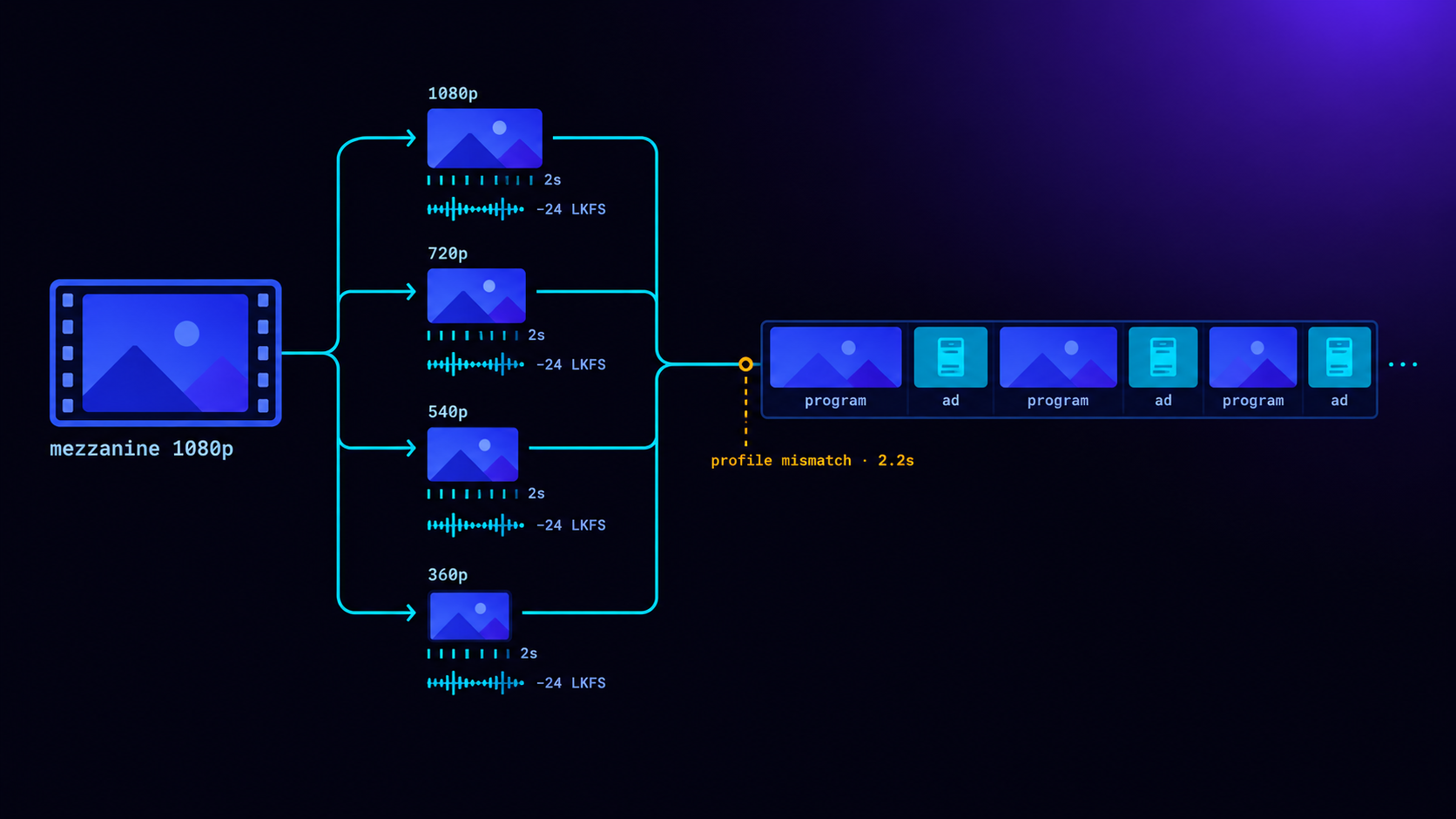
An ad that plays perfectly as a file can still break a stream when it is stitched into one. With server-side ad insertion the ad is not a separate video. It becomes part of the programme's stream, so it has to look like the programme to the player's decoder. That means the same codec and a compatible profile, a matching ladder of resolutions and bitrates, keyframes exactly where segments start, the same segment length and container, and audio in the same format at broadcast loudness. Advertisers should deliver one high-quality master file, usually called the mezzanine. The ad server or stitcher then turns it into every version the stream needs, checks each one, and refuses to stitch an ad that does not match.
This post explains each of those requirements, why it exists and what goes wrong without it. It uses the actual settings from the conditioning pipeline we built for LtvAdx SSAI, and one stall we only found by watching real players.
Why SSAI is stricter than client-side ads
With client-side ad insertion, the player stops the programme, reads a VAST response, picks one of the listed video files and plays it, often in a separate player instance. If the ad is 1280×720 at 2 Mb/s and the programme is 1080p at 6 Mb/s, nothing breaks. The player starts a fresh decoder for the ad and another when the programme resumes. The cost is a visible pause at each switch, which is one of the reasons publishers move to SSAI.
With SSAI, there is no switch the player knows about. The stitcher rewrites the playlist so the ad's segments sit between the programme's, separated by a discontinuity marker that tells the player "timestamps and encoding may change here". A well-behaved player resets what it must and carries on. But it does so inside one playback session, with one adaptive bitrate ladder and, often, one decoder that it would rather not tear down. The closer the ad is to the programme, the less the player has to do at the boundary, and the less can go wrong.
That is why every serious SSAI service conditions ads itself rather than stitching whatever file the advertiser uploaded. The SSAI explainer covers the stitching side. This post is about what has to happen to the ad first.
What a mezzanine file is, and what to deliver
A mezzanine file is the high-quality master of an ad, from which every delivery version is made. It is not what viewers receive. It is the source for re-encoding, so it should carry as much quality as possible and nothing that will cause trouble later.
Publishers and platforms each publish their own specifications, and they vary. The common ground, which covers most CTV platforms, is:
Resolution      1920×1080 (or higher), progressive, square pixels
Frame rate      The native rate, constant (23.976, 25, 29.97 or 30)
Video           High-bitrate H.264 or ProRes; no letterboxing burned in
Audio           Stereo, 48 kHz, a real mix (not a placeholder track)
Duration        Exactly the sold length (15 s, 30 s), with no black
                or slate padding at either end
Container       .mov or .mp4
On LtvAdx an advertiser uploads one file of up to 300 MB and 1 to 120 seconds, in any format our probe can read. Everything else is derived from it. The CTV creative best practices guide covers the creative side, what makes an ad work on a television, and the creative approval timeline covers how long the process takes across platforms.
What VAST says about the master file
The VAST standard recognised this problem directly. Version 4.0 added a Mezzanine element to the media section of an ad, so that an ad server can point an ad-stitching service at the master file instead of only listing finished delivery versions. A stitcher that receives a mezzanine can transcode it to match each stream. A stitcher that receives only a 720p MP4 at 2 Mb/s has to either re-encode an already compressed file, losing quality, or reject the ad. The current text is published by the IAB Tech Lab on its VAST standard page.
In practice, many ad servers still return only delivery files, and many stitchers transcode whatever they are given the first time they see an ad, then use the result from the next request on. That is why a new ad often fails to appear in an SSAI break the first time it wins: it was not ready yet. Conditioning the ad when it is uploaded, rather than when it first wins, removes that delay. When an ad has been conditioned, the VAST it returns lists one progressive MP4 for every ready rung, with its real width, height, bitrate and codec, plus the HLS master playlist as a streaming file, so client-side players get a proper choice too.
Step 1: build the ladder
Streams are delivered as a ladder of versions at different resolutions and bitrates, and the player moves up and down the ladder as the viewer's connection changes. An ad stitched into the stream needs its own ladder, so that whatever rung the player is on when the break starts, there is an ad version at a similar rung.
Our conditioner builds 1080p, 720p, 540p and 360p versions. It never builds a rung above the source's resolution, because upscaling adds bits without adding quality, and it always builds 360p so there is something for the weakest connections. Each rung is written as a progressive MP4, for client-side VAST and previews, and then packaged into the formats streams use: HLS with MPEG-TS segments, HLS with fragmented MP4 segments, and DASH with separate video and audio tracks.
A mismatch here rarely breaks playback outright, but it shows. If the programme's top rung is 1080p and the ad's is 720p, viewers on good connections see a visible drop in sharpness at every break. If the programme's lowest rung is far below the ad's, viewers on poor connections stall during ads. The stitcher's job is to map each programme rung to the closest ad rung. The conditioner's job is to make sure a close rung exists.
Step 2: put keyframes exactly where segments start
Video compression stores most frames as differences from earlier frames. Only keyframes can be decoded on their own. A player that starts reading a segment needs that segment to begin with a keyframe, or it has nothing to decode the first frames against. In a stitched stream, the first ad segment arrives straight after a discontinuity, so this is not optional.
Apple's HLS authoring specification asks for keyframes every 2 seconds and a 6-second target segment duration, and most other platforms follow similar rules. So the conditioner encodes with a fixed group of pictures: a keyframe every 2 seconds exactly, with the encoder forbidden from adding extra keyframes at scene cuts and each group closed, so no frame refers across a boundary. Segment lengths are then multiples of 2 seconds. Our packages use 6-second segments, and because keyframes fall every 2 seconds, the same encode could be cut into 2-second segments for a stream that needs them. Every segment starts on a keyframe because every possible boundary is one.
After encoding, every version is read back and checked: keyframes must be no more than 2 seconds plus one frame apart. An ad that fails the check is not marked ready. This sounds pedantic until you see what a misplaced keyframe does in a stitched stream: a second of corrupted blocks, or a frozen frame, at the start of a paid ad.
Step 3: match the codec, and the profile
H.264 has profiles, which define which compression tools an encoder may use. Baseline uses the fewest and decodes on the most modest hardware. Main and High use more and compress better. Most streams today use High for HD content. Our conditioner encodes ads in H.264 High, and writes the codec string for each rung into the master playlist from the actual encoded level, rather than a guess, so players can decide in advance whether they can decode it.
I expected the profile to matter only for old devices. It matters more than that, and we found out by watching.
During testing of live DASH streams, one widely used web player stalled for about 2.2 seconds at the first ad break of each session. Not at later breaks. Only the first. The other DASH player we tested had no such stall, and neither did our own decoding checks, which passed everything. The cause turned out to be our test programme, which had been encoded in Baseline profile, while the ads were High. Both were valid. But that player, meeting a profile change for the first time in a session, took over two seconds to reconfigure. On a test stream encoded in High profile, matching the ads, the same player played every break without a stall.
The lesson for publishers is simple: tell your SSAI provider which codec and profile your streams use, and check that ads are conditioned to match. The lesson for anyone building a stitcher is that decoding checks are necessary and not sufficient. Real players find things decoders do not.
Step 4: audio, the part people forget
Audio problems at ad boundaries are less visible than video problems and often more annoying. Three things need to match.
Format. The conditioner encodes AAC-LC at 128 kb/s, 48 kHz, stereo. A 44.1 kHz ad in a 48 kHz stream forces the player to reconfigure its audio output at the boundary, which on some devices is an audible click or a short silence.
Presence. Some ads arrive with no audio track at all: a silent product shot, a text-only spot. A stream that has audio everywhere except during one ad confuses players and stitchers alike, especially when audio is delivered as a separate track. So the conditioner adds a silent audio track to any source without one. An ad without sound still has an audio track.
Loudness. Viewers notice loud ads more than anything else on this list, and in the United States the CALM Act requires commercials on broadcast and cable to match the loudness of the programming around them. The conditioner runs two-pass loudness normalisation to −24 LKFS integrated with a true peak no higher than −2 dBTP, the ATSC A/85 target that US broadcast uses. Every version is measured afterwards and must land within 2 LU of the target. The CTV ad loudness post explains the standards and why streaming inherited them.
One detail about separate audio tracks is worth knowing if you package streams yourself. AAC encodes audio in frames of 1,024 samples, which at 48 kHz is about 21.3 milliseconds. Six seconds is 281.25 of those frames, so an audio segment cannot be exactly six seconds long. In our own conditioned test ad, the five video segments were each exactly 6.000 seconds and the audio segments were 5.952, 5.995, 5.995, 5.995 and 6.080 seconds. That is normal. What matters is that video and audio have the same number of segments, so the stitcher can pair them, and the conditioner checks exactly that before an ad is allowed into a stream with separate audio.
Step 5: the container and its timing
Streams use two main containers for segments. MPEG-TS, the older one, packs audio and video into self-contained chunks. Fragmented MP4, the basis of CMAF, stores the decoding setup in a separate initialisation segment and keeps each media segment small. DASH uses fragmented MP4. HLS can use either.
An ad stitched into a fragmented-MP4 stream must itself be fragmented MP4, with its own initialisation segment, and the playlist must point the player to the ad's initialisation segment at the start of the ad and back to the programme's at the end. An MPEG-TS ad cannot be dropped into a fragmented-MP4 stream. So the conditioner produces both, plus a version with audio and video in one track for streams that use that layout, and the stitcher picks the one matching the stream. If an ad does not have a version of the right kind, it is not eligible for that stream, and the break is filled with another ad or with slate.
That last rule is important enough to state on its own: an ad that cannot be stitched cleanly should not be stitched at all. A viewer watching a second of slate is a missed impression. A viewer whose stream stalls or errors is often a lost viewer, and every ad after them is lost too.
Step 6: check everything before calling it ready
Encoding is the easy part. Checking is what makes conditioning reliable. Every version our conditioner produces is read back and verified before the creative is marked ready:
Check                       Rule
──────────────────────────  ──────────────────────────────────────────
Codecs and profile          H.264 High video, AAC-LC audio, as expected
Duration                    Within 2% of the source
Keyframe spacing            No more than 2 s + 1 frame apart
Loudness                    −24 LKFS ± 2
Audio present               Always (silent track added if needed)
Segment counts              Video, audio and muxed packages agree
Playlists                   Master lists real peak and average bitrate
                            and the codec string from the actual level
Only after every check passes is the ad marked ready. Approval then requires either conditioned media or a hosted HTTPS video URL that answers with video at the moment of approval. The publishing location for each version is new and permanent, so a viewer partway through an ad never receives a mixture of an old version and a new one.
What we found when we looked at our own creatives
I want to be candid about why we built all this, because it is the most useful thing in this post for anyone running an ad platform.
In early October, before building SSAI, we checked every approved video creative on LtvAdx. Every one of them pointed at a file that could not be played. Thirty-three sample creatives pointed at a hosting address that a routing rule was sending to the wrong server, which answered 404. Eight test leftovers pointed at an external sample file that answered 403. Forty-one approved creatives, none playable.
Worse, the VAST we generated described media that did not exist. Every video URL was labelled 1920×1080 at 4 Mb/s, whatever it really was, and a WebM alternative was listed that had never been created. A player choosing WebM would have received a 404. And approval checked nothing, so a dead URL could be approved and stay approved. An advertiser could even change the video of an already approved creative without it going back to review.
All of that is fixed. The hosting route now reaches the media host, the sample creatives play, and the eight test leftovers were archived. The VAST lists only versions that exist, with their real sizes, bitrates and codecs. Approval checks the media. Changing the video or landing page of an approved creative sends it back to draft. None of it would have shown up in a demo, because a demo uses one hand-picked file. It showed up because we asked a boring question about every creative at once: can this actually be played?
If you run or buy from an ad platform, I would ask that question of it. The VAST inspector lists the media files a tag declares, and the VAST validator checks the response against the specification. Neither proves the files play, so try fetching one. The VAST error codes post explains what players report when they cannot.
How long conditioning takes, and what it costs
Conditioning is not instant, and it should be planned for. On our production server, a 10-second 1080p test clip conditioned in about 25 seconds and passed every check. A 30-second asset with its full set of versions and packages took about 110 seconds, running at the lowest scheduling priority so it never competes with ad serving. Upload a day before a campaign starts, not an hour before, and approval can happen as soon as processing finishes.
Storage and delivery are the other costs. That 30-second asset, with eight versions across all its packages, came to 98 MB. Delivery dominates: a 30-second ad at around 3 Mb/s is roughly 11 MB every time it plays, which is why publishers and platforms put ad media behind a content delivery network once volume grows. The CTV supply chain post discusses where costs like this sit in the ad dollar.
A checklist for advertisers
- Deliver one mezzanine at 1080p or above, at its native constant frame rate, with a real stereo mix.
- Make it exactly the sold length. Padding is trimmed or rejected, and slates at the start waste the most-watched seconds.
- Mix to broadcast loudness, or expect it to be normalised. Normalisation cannot fix a mix that sounds wrong at the right level.
- Upload a day ahead. Conditioning and approval take time, and an ad that is not ready is not eligible.
- Do not swap the file on an approved creative at the last minute. It sends the creative back to review.
A checklist for publishers
- Tell your SSAI provider your ladder, codec and profile, segment length and container, and whether audio and subtitles are separate tracks.
- Ask how ads are conditioned to match each of those, and whether ads that do not match are excluded or stitched anyway.
- Ask which real players they test with. Our 2.2-second stall appeared in one player, on one kind of stream, at one break.
- Agree what fills an unstitchable or unsold break. A branded slate looks intentional; a black screen does not.
- Watch startup and stall rates during breaks after launch. They are the first sign of a conditioning mismatch.
Publishers running FAST or linear channels can see how conditioning fits the rest of the pipeline on the FAST channels page. The SCTE-35 live stitching post covers what happens once a conditioned ad reaches a live break, and the SSAI tracking post covers how its plays are counted. Advertisers can read how buying works on the advertiser page and create an account to upload a first creative.
Frequently asked questions
What is a mezzanine file in CTV advertising?
A mezzanine file is the high-quality master version of an ad from which every delivery version is encoded. It is usually 1080p or higher, at a high bitrate, with a stereo mix at 48 kHz and no padding. It is never shown to viewers directly. The ad server or stitcher transcodes it into the resolutions, bitrates and formats each stream needs.
Why do ads need to be transcoded for SSAI?
In SSAI the ad becomes part of the programme's stream, so the player decodes it in the same session. A mismatch in resolution ladder, codec profile, keyframe placement, segment length, container or audio format can cause stalls, glitches or errors at the break. Transcoding the ad to match the stream removes those differences before the ad is stitched.
What loudness should CTV ads be?
For US delivery, −24 LKFS integrated loudness with true peaks no higher than −2 dBTP, the ATSC A/85 target that the CALM Act relies on. Many platforms normalise ads to this level automatically. LtvAdx normalises every conditioned ad to −24 LKFS and rejects a version that measures more than 2 LU away.
Why does a stream stall at the first ad break?
A common cause is an encoding mismatch between the programme and the ad that forces the player to reconfigure its decoder, such as a change of codec profile. Some players handle the first change in a session slowly. In our testing, one DASH player stalled about 2.2 seconds at the first break when the programme was Baseline profile and the ads High, and did not stall when both were High.
What keyframe interval should CTV ads use?
A fixed interval that divides evenly into the stream's segment length, with closed groups of pictures and no extra keyframes at scene cuts. Two seconds is common, since it fits both 2-second live segments and 6-second on-demand segments. Every segment must begin with a keyframe, or the player cannot decode its first frames after the break boundary.
Can an MPEG-TS ad be stitched into a CMAF stream?
No. A CMAF or fragmented-MP4 stream needs ads in fragmented MP4 with their own initialisation segment, and an MPEG-TS stream needs MPEG-TS ads. A conditioning pipeline should produce both, and a stitcher should exclude an ad that lacks the right version rather than stitching it anyway.
How long does it take to prepare a CTV ad for SSAI?
The encoding itself takes minutes rather than hours for a 30-second ad: on our server a full set of versions and packages took about two minutes. Review and approval add more, so upload at least a day before a campaign starts. Across many publishers with separate approval processes, the full timeline can stretch to several days.
Stay ahead of CTV and addressable TV
Get articles on streaming monetization, identity, and programmatic TV.
Subscribe + request demo →Head of CTV Product, LtvAdx
Related articles

CTV Geo-Targeting by IP: Whose Address Is It?
CTV country targeting rests on one IP lookup. It fails when the address is the SSAI server's, when IND meets IN, or when unknown counts as a match.

CTV Lift Tests: How Many Households You Need
A 10% lift on a 1% baseline needs 326,000 households split evenly, 906,000 with a 10% holdout, and about 2.5 million at 60% reach.

CTV Reach Curves: Why 70% Becomes 35%
The standard planning formula assumes perfect frequency control. Without it, a plan for 70% reach at frequency three delivers effective reach nearer 35%.

Whose Number Settles Your TV Guarantee?
A guarantee is a contract about a figure a third party produces later. With four certified currencies now in play, naming which one is the clause that matters.

CTV Ad Loudness: The Rule That Silences Spots
California's SB 576 extended loudness law to streaming on 1 July 2026. The failure mode is not a quieter ad. It is an ad that never runs at all.

Where Your CTV Ad Dollar Actually Goes
The ANA traced it: 36 cents of every programmatic dollar reached working media in 2023, about 45% by 2026. CTV is the fastest-growing and least efficient slice.
Start trading TV
Ready to monetise CTV inventory?
See how LtvAdx fits your streaming and addressable TV setup — start free or book a walkthrough.
<10ms
VAST decision latency
p99 under 15ms — product specification
7-tier
HouseholdID graph tiers
UID2 · PPID · ADID · DeviceID · ACR · IP/24 · fingerprint
Illustrative platform metrics · System status