CTV Ad Category Blocking: What bcat Really Blocks
OpenRTB defaults to a deprecated taxonomy with no gambling or crypto codes. How bcat, badv and cattax work, where CTV block lists leak, and how to close them.
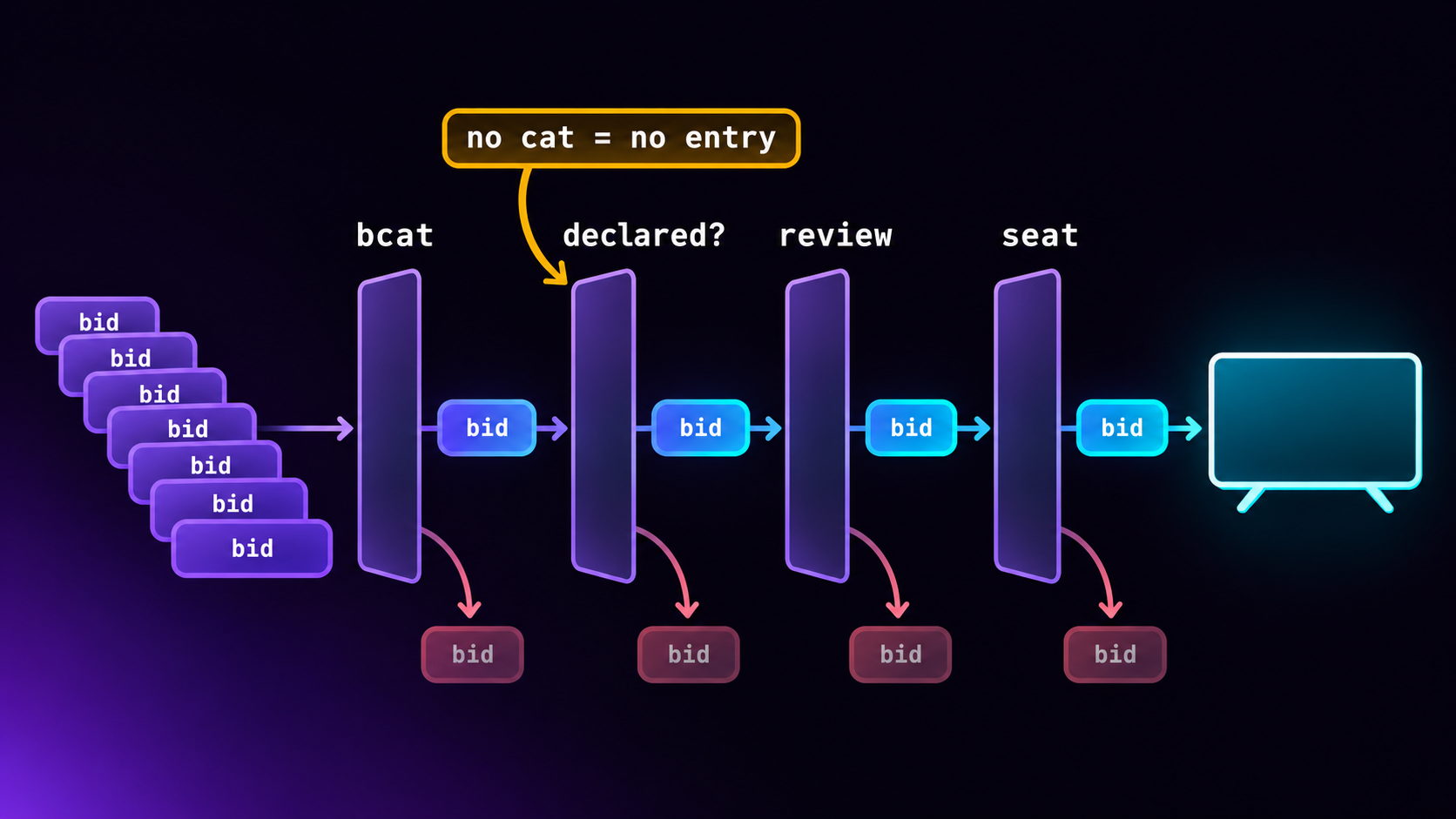
In CTV, a category block in the bid request only stops bids that honestly declare a category, in a taxonomy both sides read. That is a smaller net than most publishers assume. OpenRTB 2.6 still defaults the cattax field to IAB Content Taxonomy 1.0, which IAB Tech Lab itself marks as deprecated, and which has no code for gambling, cryptocurrency or prescription drugs. A request can name only one taxonomy for its block list, DSPs still on OpenRTB 2.5 cannot read that field at all, and plenty of bids arrive with no category whatsoever. So a block list that works needs four layers: the right codes before the bid, a check on what each bid declares when it comes back, a review of creatives from buyers you have never seen, and consequences for buyers who keep leaving categories out.
This post explains how bcat, badv and cattax work, where blocks leak, and what we built into the LtvAdx exchange in November after working through IAB’s taxonomy files line by line. It is written for FAST channel owners, CTV app publishers and the ad ops people who look after their demand.
The four fields that carry a block list
An OpenRTB bid request has four places to tell buyers what you will not accept. The definitions below are from the OpenRTB 2.6 specification.
Field    Where           What it holds
───────  ──────────────  ─────────────────────────────────────────────
bcat     BidRequest      Blocked advertiser categories
acat     BidRequest      Allowed categories (use acat or bcat, not both)
cattax   BidRequest      Which taxonomy bcat/acat use. Default 1
badv     BidRequest      Blocked advertiser domains, e.g. "ford.com"

cat      Bid (response)  The creative's categories, in Bid.cattax
adomain  Bid (response)  The advertiser's domain(s), for block checks
The request side is a promise you ask the buyer to keep. The response side is the buyer telling you what it is sending. A block only works when both halves are filled in and agree on the codes. If a DSP returns a bid with no cat and no adomain, your bcat and badv had nothing to match against.
badv is the simpler of the two and the more reliable, because a domain is unambiguous. Use it for named competitors and any advertiser you have had trouble with. Categories are where the difficulty lies.
One more piece of context. In a FAST channel or CTV app, these fields are usually filled in by your exchange or SSP from settings you chose in its interface, not typed by hand. If you connect DSPs through LtvAdx, the OpenRTB connection guide shows what goes out. Whatever platform you use, ask to see a real outbound request once. It is the fastest way to find out what your block list really says to buyers.
Two taxonomies, one field
IAB Tech Lab publishes several taxonomies, and the AdCOM list of category taxonomies gives each a number for cattax. The two that matter for ad blocking in practice are:
- Content Taxonomy 1.0 (
cattax1). The codes everyone recognises:IAB7for Health & Fitness,IAB14-1for Dating. Written to describe content, it became the de facto list for ads too, because for years nothing else existed. AdCOM now describes it as deprecated and recommends it is not used. It is still the default. - Ad Product Taxonomy 2.0 (
cattax8). Built to describe what an ad is selling. The copy we use has 584 categories with numeric IDs from 1000 to 1582.
The difference shows up the moment you try to block a sensitive category. Content 1.0 was never meant to describe products, so it has gaps where publishers most need codes:
What you want to block   Content 1.0              Ad Product 2.0
───────────────────────  ───────────────────────  ─────────────────────────────
Gambling                 (no code)                1361 Gambling, 1362-1367
                                                  (Casinos ... Sports Betting)
Cryptocurrency           (no code)                1448 Non-Fiat Currency,
                                                  1449-1451
Prescription drugs       (no code)                1473 Pharmaceuticals,
                                                  1521 Doctor Prescribed Medicines
Tobacco and vaping       IAB9-9 Cigars only       1544 Tobacco, 1545-1550
                                                  (incl. 1548 Vaping)
Alcohol                  IAB8-5 Cocktails/Beer,   1002 Alcohol, 1003-1007
                         IAB8-18 Wine
Dating                   IAB14-1 Dating           1259 Dating, 1260-1261
Misleading offers        (no code)                (no code)
Read the left column carefully. A publisher that blocks “tobacco” with Content 1.0 is blocking cigars. Vapes, the category most likely to worry a family-friendly channel, have no 1.0 code at all. A publisher that wants to keep sports betting off a channel during a match cannot say so in 1.0.
IAB publishes a mapping from Content 1.0 to Ad Product 2.0 in its taxonomies repository, and it is useful, but it is not lossless. IAB8-5 “Cocktails/Beer” maps to 1006 Spirits, not to 1004 Beer. If you translate a 1.0 block list mechanically, a beer ad declared in 2.0 can slip through. Where a category matters, list the 2.0 codes yourself.
The one-cattax problem
Here is the catch that most guides miss. OpenRTB 2.6 gives a bid request one cattax, and it applies to the whole bcat array. You cannot put Content 1.0 codes and Ad Product 2.0 codes side by side in the same list and expect a buyer to tell them apart. 1002 means Alcohol in Ad Product 2.0 and something else entirely, or nothing, in another taxonomy.
So you have to choose. Send 1.0, and the buyers who have moved to 2.0 must translate your list, while gambling and crypto cannot be expressed at all. Send 2.0, and buyers that only read 1.0 may ignore the list or misread the numbers. Older integrations make it worse: a DSP on OpenRTB 2.5 has no cattax field, so it assumes 1.0 whatever you meant.
Our answer was to send both, in a way that does not break the spec. The standard bcat carries one taxonomy with its cattax, and an extension carries the other. By default the standard field is Content 1.0, because that is what the most buyers read:
{
  "bcat": ["IAB8-5", "IAB8-18", "IAB9-9", "IAB14-1"],
  "cattax": 1,
  "badv": ["competitor.com"],
  "ext": {
    "ltvadx_bcat": {
      "cattax": 8,
      "bcat": ["1002", "1003", "1004", "1005", "1006", "1007",
               "1361", "1362", "1363", "1364", "1365", "1366", "1367",
               "1544", "1545", "1546", "1547", "1548", "1549", "1550",
               "1259", "1260", "1261"]
    }
  }
}
For a DSP that our staff have marked as reading Ad Product 2.0, the two swap places: 2.0 goes in bcat with cattax 8, and the 1.0 list moves to the extension. A DSP on 2.5 gets 1.0 in bcat with no cattax at all, because that version has nowhere to put one.
Notice that every child code is listed. A well-built DSP will treat a blocked parent as blocking its children, but you should not depend on it. Listing 1361 through 1367 costs a few bytes and removes the question.
An extension only helps buyers who read it, so the bid request is still not enough on its own. That is why the next three layers exist.
Where a CTV block list leaks
Even with clean codes going out, ads you blocked can still reach your viewers. These are the routes we found when we traced it through.
- The bid declares nothing. No
cat, noadomain. Both are optional in OpenRTB 2.6, and some buyers leave them out. Your block had nothing to match. - The bid declares in a taxonomy you do not read. A
cattaxof 7 (Content 3.0) on a bid tells you about content, not the product, and your 1.0 list cannot be compared with it. - The category is vague or wrong. A sports betting app declared as “Sports” is technically a category. It is just not the one you blocked.
- The domain hides the brand. An affiliate or agency domain in
adomainrather than the brand’s own. Yourbadvlists the brand, so it never matches. - The creative changes. The VAST behind a bid can be swapped after the first time you saw it. Approval of one creative is not approval of the next.
- Insertion bypasses the auction. Ads stitched in by SSAI from a different ad server, or direct deals trafficked by hand, never see your exchange’s block list. Check that every route into your breaks applies the same rules. The end-to-end walkthrough of CTV ad serving shows where those routes are.
The first one is the most common and the easiest to fix, because you control what you accept.
Check every bid that comes back
On a channel where the publisher has blocked a sensitive category, or on any children’s channel, LtvAdx applies these rules to each bid from an outside DSP before it can win:
- A bid that declares neither a readable
catnor anadomainis refused. If a buyer will not say what it is selling, it does not get a sensitive slot. - A bid whose
cat, read in its owncattax, names a blocked category is refused. We read Content 1.0 and Ad Product 2.0, and walk the tree, so a bid for1366Sports Betting is caught by a block on1361Gambling. - A bid whose
adomainour staff have listed under a blocked category is refused, even if itscatsays something harmless. This is how the vague and wrong declarations get caught.
Every refusal is reported to the DSP with a standard OpenRTB loss reason, so a buyer can see why it lost rather than guessing:
Code  Meaning                                      When we send it
────  ───────────────────────────────────────────  ─────────────────────────────
10    Missing Minimum Creative Approval Data       No cat and no adomain
209   Creative Filtered - Category Exclusions      cat names a blocked category
205   Creative Filtered - Advertiser Exclusions    domain listed as restricted
201   Creative Filtered - Pending Processing       new creative awaiting review
202   Creative Filtered - Disapproved by Exchange  creative rejected on review
8     Missing Creative ID                          no crid, domain not reviewed
104   Buyer Seat Blocked                           seat isolated (see below)
On channels with no sensitive block, none of this refuses anything. A publisher who has not ticked a sensitive category sees no change in fill. That was deliberate: the cost of the checks falls only on inventory whose owner asked for them.
Creatives you have never seen need a human
Declared categories are self-reported. On a sensitive channel, the only way to know what a new ad from an unfamiliar buyer contains is to look at it.
So an outside creative runs on a sensitive channel only once our staff know it: they have approved that creative, or reviewed its advertiser’s domain. The first time an unknown creative bids, it is filed for review and the bid is refused as pending. Staff watch the video and record any sensitive category they find, which means an approved ad still stays off channels that block that category. A creative is identified by its buyer seat, its creative ID and its domains together, so a swapped VAST with a new ID goes back into the queue.
I want to be plain about one limit. Nothing classifies video automatically yet. The review is done by people. Speech-to-text and on-screen text recognition would catch some things faster, and the review queue is built so they can be added, but today it is human. The post on approval queues explains why this kind of review adds days to a campaign, and why buyers should expect it on sensitive inventory.
Make undeclared categories cost the buyer
Refusing a bid protects one break. It does not change the buyer’s behaviour. For that, a seat that keeps sending ads for restricted brands without declaring the category has to lose something.
On LtvAdx, when a bid’s domain is on the staff list for a sensitive category and its cat does not say so, that counts as a strike against the buyer seat, on any channel. Three strikes in 30 days and the seat is isolated: its bids are refused, with loss code 104, on every channel that has sensitive blocks, until staff restore it. It can still buy everything else.
The threshold is a judgement call. One strike could be an honest mistake in a buyer’s setup. Three in a month is a pattern. We chose isolation from sensitive channels rather than a full ban because a buyer that mislabels gambling ads may still be a perfectly good buyer for a cooking channel that blocks nothing.
Build a block list that does not empty your breaks
Every block removes demand. A long list on a channel with modest demand can turn a healthy fill rate into empty breaks, and the FAST yield playbook shows how quickly that costs money. Some practical rules:
- Start with domains, not categories. Named competitors and problem advertisers in
badvare precise and cost little fill. - Block sensitive categories by intent, then let the system find the codes. On LtvAdx you tick “gambling” and the codes in both taxonomies go out for you. If your platform makes you pick codes, use Ad Product 2.0 for anything 1.0 cannot express.
- Block parents only when you mean the whole tree. Blocking
IAB7Health & Fitness takes out fitness equipment and health insurance along with the pharmaceutical ads you were worried about. The healthcare and pharma guide covers that category in detail. - Treat children’s channels separately. They need every sensitive category blocked and every outside creative reviewed, and the COPPA guide explains why. On LtvAdx that happens automatically for channels marked as kids content.
- Use competitive separation for pods, not block lists. Two car ads in one break is a pod problem. Blocking the category loses both. The ad pod strategy post covers separation.
- Watch fill for two weeks after a change. Expect a dip when a sensitive category is first ticked, while new outside creatives wait for review. If it does not recover, your list is too broad.
Political and issue advertising deserves its own policy rather than a line in a block list. The CTV political ads guide covers it.
Audit what your buyers actually declare
Before changing anything, find out how big the leak is on your own inventory. Most exchanges and SSPs can export won or received bids with their cat, cattax, adomain and crid. A day or a week is enough. Then answer four questions:
For each DSP / seat, over the sample:

1. Share of bids with no cat              -> how often bcat cannot apply
2. Share of bids with no adomain          -> how often badv cannot apply
3. cattax values seen (none, 1, 8, other) -> which taxonomy to send them
4. Distinct crids per adomain             -> how often creatives rotate

Then: list the adomains you do not recognise, and look them up.
The first two numbers tell you how much of your demand is effectively unblockable by the bid request alone. If a large buyer leaves cat empty on most of its bids, no amount of care with your codes will help; you need the response-side check, or a conversation with that buyer. The third tells you which taxonomy to lead with for each DSP. The fourth tells you how heavy a creative review will be.
The unrecognised domains are often the most useful output. Lead-generation networks, affiliate programmes and app-install agencies tend to bid under their own domains rather than the brand’s, and a short list of them is worth sending to whoever reviews creatives. The supply path optimisation guide covers the sell side of the same exercise.
If you are the buyer: what to send
Advertisers and DSPs lose bids to these rules mostly by omission. If you buy CTV inventory programmatically, a few habits keep you out of the refused pile and make your ads eligible for the channels that block most:
- Always send
adomain, with the brand’s own root domain, not your agency’s or a tracking domain. It is the one field every exchange can check without interpretation. - Always send
cat, and send it in Ad Product 2.0 withBid.cattaxset to 8 if your platform can. A product taxonomy describes your ad far better than a content one. - Declare sensitive categories honestly. An alcohol brand that declares
1002loses the channels that block alcohol and keeps everything else. One that declares “Food & Drink” may win a few extra breaks, then lose every sensitive channel when its seat is isolated. - Keep creative IDs stable. A new
cridfor the same video sends it back through review. A changed video under an oldcridis the behaviour reviewers look for. - Read your loss codes. A 201 means wait for review; a 209 means the category is blocked there; a 10 means you sent nothing to check. The CTV DSP buying guide covers the rest of a clean setup.
What we learned building it
A few decisions from the build, because they apply to anyone running this kind of check.
Every code came from IAB’s file, not from memory. Category IDs are easy to misremember and the mistakes are silent: a wrong number blocks nothing and raises no error. We copied IAB’s Ad Product 2.0 file and its 1.0-to-2.0 mapping byte for byte from the official repository, recorded the commit they came from, and wrote a test that fails if any code we rely on is missing or renamed. If you maintain your own lists, do the same.
No blanket ban. The simple answer to “an outside DSP might send a gambling ad” is to turn outside demand off on sensitive channels. It is also the answer that costs publishers the most revenue. We chose four layers that refuse only the bids that cannot show they are safe.
Misleading offers cannot be expressed in either taxonomy. Neither Content 1.0 nor Ad Product 2.0 has a code for get-rich-quick schemes or miracle cures. A publisher can block the category on LtvAdx, but DSPs cannot be told about it before they bid. Only the creative review and the staff domain list catch it. Say so to publishers rather than implying the bid request covers it.
Blocks need a paper trail. Every change to a publisher’s block list is confirmed in writing to the account’s owners and admins: what is now blocked, who changed it, and the time by which it is in force, a minute after saving at the latest. When a sponsor asks “when did you start blocking our competitor?”, there is an answer. The brand safety help article describes the screen.
A checklist for publishers
- List what you must never run, in plain words, before you touch codes.
- Put competitor and problem domains in
badv. - For each sensitive category, check whether Content 1.0 can express it. If not, make sure Ad Product 2.0 codes reach your buyers.
- Ask your exchange which
cattaxit sends, whether it sends both taxonomies, and what it does with bids that declare no category. - Check every other route into your breaks: SSAI from another ad server, direct deals, house ads.
- Mark children’s channels as kids content so the strictest rules apply.
- Watch fill for two weeks after any change, and trim the list if fill does not recover.
If you connect your own DSPs, the My DSPs article explains how your block list travels with every request, and the OpenRTB best practices for CTV post covers the rest of the request. For the wider picture, the CTV brand safety guide covers app-ads.txt, sellers.json and supply chain controls, and the CTV ad fraud post covers invalid traffic.
The publisher page shows how LtvAdx handles demand for FAST channels and CTV apps, the FAST channels page covers setup, and you can create an account to see the brand safety controls. The outside-DSP checks described here are in Beta.
Frequently asked questions
What is bcat in OpenRTB?
bcat is the list of advertiser categories a publisher blocks, sent in the bid request. The taxonomy the codes come from is set by the cattax field. If cattax is missing, buyers assume IAB Content Taxonomy 1.0. A buyer is expected not to bid with a creative in a blocked category.
What is cattax in OpenRTB 2.6?
cattax says which IAB taxonomy a list of categories uses, by number from the AdCOM list. 1 is Content Taxonomy 1.0, the default, and 8 is Ad Product Taxonomy 2.0. A bid request has one cattax for its block list, and each bid has its own cattax for the categories it declares.
Can I block gambling ads with IAB categories?
Not with Content Taxonomy 1.0, which has no gambling code. Ad Product Taxonomy 2.0 has one: 1361 Gambling, with children from 1362 to 1367 including Sports Betting. Your exchange has to send those codes with cattax 8, or in an extension the buyer reads, and check what each bid declares.
Why do blocked ads still appear on my CTV channel?
Usually because the bid did not declare a category, declared a vague one, used a taxonomy your list was not in, or named an affiliate domain instead of the brand. Ads inserted outside your exchange, such as through another ad server’s SSAI, also skip your block list. Requiring every bid to declare a category or domain closes the biggest gap.
What is the difference between Content Taxonomy and Ad Product Taxonomy?
Content taxonomies describe what a programme or page is about. The Ad Product Taxonomy describes what an ad is selling. Content Taxonomy 1.0 was used for ads for years because nothing better existed, but it has gaps for products such as gambling, cryptocurrency and vaping. Ad Product Taxonomy 2.0 fills them.
What is badv in a bid request?
badv is the list of advertiser domains a publisher blocks, such as a competitor’s website. It works by matching the adomain a bid declares, so it is precise but only as good as that field. A bid that declares an agency or affiliate domain instead of the brand will not match.
Does blocking ad categories lower fill rate?
Yes. Every block removes some demand, and broad parent categories remove a lot. Start with advertiser domains and the specific sensitive categories you need, block parent categories only when you mean the whole tree, and watch fill for two weeks after each change.
Stay ahead of CTV and addressable TV
Get articles on streaming monetization, identity, and programmatic TV.
Subscribe + request demo →Head of CTV Product, LtvAdx
Related articles
CTV Ad Avails: How to Measure Your Real Inventory
Ad requests are not avails. How to filter, split and report a channel's real CTV inventory, count unique households and turn it into a forecast.
Selling Ads Directly on Your FAST Channel
What a direct-sold CTV campaign needs to serve: a playable creative, channels, pacing and targeting. Plus the defects we fixed and a live test.
CDN for CTV Ads: What to Cache, What to Keep Off
Put CTV ad media on a CDN, keep VAST, beacons and SSAI manifests off it. The caching rules, two near-outages and a DNS mistake from our own cutover.
SSAI Tracking: Server-Side vs Client-Side Beacons
Server-side SSAI beacons fire when segments are fetched, not watched. How server and client tracking differ, and three problems both must solve.

SCTE-35 in HLS: What Breaks When You Stitch Live
Reading the SCTE-35 cue is easy. Filling the break, keeping HLS sequence numbers monotonic and deciding once across variants is where live SSAI fails.

VAST Error Codes in CTV: Which Ones Cost Money
Error 303 is usually no-fill. Errors 401 to 405 are won ads that never played. How to price each VAST error code in CTV, and who owns the fix.
Start trading TV
Ready to monetise CTV inventory?
See how LtvAdx fits your streaming and addressable TV setup — start free or book a walkthrough.
<10ms
Ad decision latency
P95, measured on the ad server
7-tier
HouseholdID graph tiers
UID2 · PPID · ADID · DeviceID · ACR · IP/24 · fingerprint
Illustrative platform metrics · System status