Selling Ads Directly on Your FAST Channel
What a direct-sold CTV campaign needs to serve: a playable creative, channels, pacing and targeting. Plus the defects we fixed and a live test.
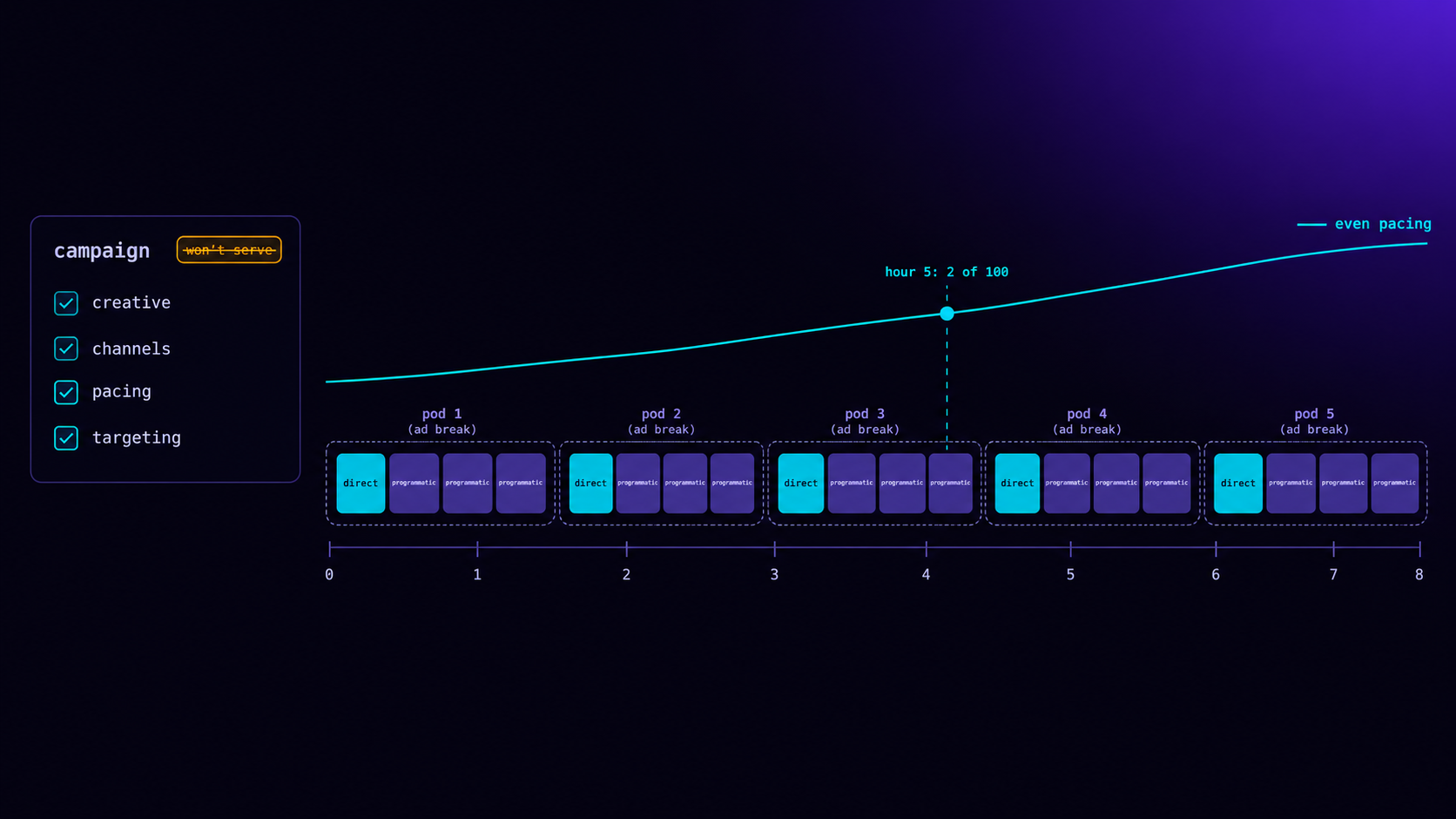
Selling ads directly on your FAST channel takes six things: a playable creative, the channels it may run on, flight dates, an impression goal, a pacing rule and any targeting the advertiser bought. Your ad server then has to give the campaign priority over programmatic demand, return it to players as a proper VAST ad rather than a bare link, fit it into ad pods and server-side insertion if your channel uses them, and stop it when the flight ends or the goal is met. Most direct deals that under-deliver fail on the first two items, not on demand. Either the creative is not something a television can play, or the campaign is not attached to the channel the viewer is watching.
This post walks through each piece, what the ad server must do with it, and the defects we found and fixed in our own direct-campaign tools this month. It ends with a checklist to run before your first direct campaign goes live.
Why sell direct at all
Programmatic demand fills breaks without any sales effort, which is why most FAST channels start there. Direct sales add three things programmatic cannot.
Advertisers who do not buy programmatically. Local businesses, regional brands, event promoters and sponsors who want to be associated with a particular programme often buy by insertion order or a phone call. They will never reach you through a demand-side platform.
Price and placement control. A direct deal sets its own price, and it can take a specific position, such as the first ad in every break of a match, or every slot in a sponsored break.
Relationships that renew. A sponsor whose campaign delivered as promised, with a clean report, tends to come back. Programmatic buyers rarely know which channel they bought.
The trade-off is responsibility. With programmatic demand, if an ad fails to play, someone else's campaign under-delivers. With a direct deal, it is your promise. The posts on FAST channel monetisation and upfronts versus programmatic cover how direct and programmatic demand fit together.
Where direct campaigns sit in the decision
When a viewer reaches an ad break, the ad server considers every eligible source in priority order. In LtvAdx the order is:
Priority  Source
6         Direct sold (the publisher's own campaigns)
5         Programmatic guaranteed
4         Direct insertion orders
3         Addressable
2         Private marketplace deals
1         Open auction
A direct-sold campaign that is eligible for a request wins it outright, before any auction. That is what a direct deal promises the advertiser, and it is why the eligibility rules matter so much: anything that makes a campaign ineligible silently hands the slot to programmatic demand, and the advertiser's delivery falls short without any visible error. The programmatic guaranteed guide explains the tier below.
Direct and programmatic work together
Priority does not mean a direct campaign takes every break. It takes only the requests it is eligible for and allowed by its pacing. Every other request in the same break, and every break the campaign does not cover, falls through to programmatic demand as before. A direct deal for 100,000 impressions over a month on a channel serving a few million ad requests touches only a small share of them.
That has a practical consequence for pricing. A direct deal should be priced against what programmatic demand would have paid for the same impressions, not against nothing, because every impression a direct campaign takes is one the auction does not get. If programmatic buyers pay your channel a given CPM in prime time, a direct deal that wants prime-time breaks should pay at least that, plus a premium for the guarantee and the placement.
The creative: what a television can actually play
A direct campaign's creative arrives in one of three forms, and each needs different handling.
An uploaded video file. The best option. The ad server conditions it into every format and resolution the channel's players need: progressive MP4 at several sizes, HLS, DASH and fragmented MP4 packages, normalised to broadcast loudness, with a poster image. The player gets a choice of files that suit its connection, and the same ad can be stitched into server-side streams. The post on CTV ad transcoding explains each step.
A link to an MP4 file. Workable. The ad server returns a VAST response that names the file directly, with its duration and click-through. There is only one file, so a viewer on a slow connection gets the same bitrate as everyone else.
A VAST tag from the advertiser's own ad server. Common for agencies, which want to serve and measure the ad themselves. The ad server returns a VAST wrapper pointing at the advertiser's tag, and the player follows it. That adds a request, a dependency on someone else's server, and a source of errors you cannot fix.
The difference between the first two forms and the third matters more than it looks. Under the IAB Tech Lab's VAST standard, a response can either contain the ad (an InLine response, with the video files listed) or point to another VAST response (a Wrapper). An MP4 link returned as if it were a VAST tag fails: the player fetches the MP4, expects XML, and reports a VAST error. The VAST error codes post explains what those errors cost.
Two smaller details are worth getting right. The ad's duration must be accurate, because it decides which breaks the ad fits in. And if the advertiser supplies a companion banner, commonly 300×250, it should travel with the ad so players that can show one alongside the video do.
What we found in our own direct-campaign tools
In October a gap was reported: a publisher could not attach a creative to a direct campaign in our publisher portal. When we traced the problem through every layer, it turned out to be worse than a missing field, and it is a useful list of what to check in any ad server.
The form had no creative inputs. The storage behind it supported a creative URL, a click-through URL, a companion banner and a duration. The form offered none of them, and fixed the duration at 30 seconds with no way to change it.
Every campaign from the form was invisible to the ad server. The decision logic correctly skips any direct campaign with no creative, because there is nothing to play. So every campaign created through the portal was filtered out on every request. They showed as active in the dashboard and never served. That included real customer campaigns.
An MP4 link would have failed anyway. The ad server treated any creative URL as a VAST tag and returned it as a wrapper. An MP4 link would have produced a VAST error on the player.
The companion banner was dropped. The field existed in the campaign record but not in the data the ad server received, so it was silently discarded.
Pacing was stored but read by nothing. Campaigns had a pacing setting that no code consulted. Every campaign delivered as fast as possible.
Nothing ever completed a campaign. No process marked a campaign finished when its flight ended or its goal was reached.
All of it is fixed. The form has a full creative section with upload and link options, and an MP4 link now returns a proper InLine response with the file, duration, click-through and companion. A campaign can only be activated with a creative and at least one channel, and the dashboard flags a campaign that will not serve in plain words. Pacing works, a job completes finished campaigns every hour, and direct campaigns now serve in ad pods and server-side insertion too.
The lesson I took is the one I would pass on: when a form looks like the only problem, trace the request all the way to the ad decision before calling it fixed. Our storage supported the creative all along. Nothing downstream could use it.
Pacing: as fast as possible, even, or front-loaded
Pacing decides how a campaign spreads its impression goal across its flight. There are three common choices.
As fast as possible. The campaign takes every eligible impression until the goal is met. Simple, and right for short, urgent campaigns such as a one-day sale. For anything longer, it tends to spend the whole goal in the first days, and the advertiser's ad disappears for the rest of the flight.
Even. The campaign is allowed a share of its goal in proportion to how much of the flight has passed. In LtvAdx the check is hourly and cumulative: by hour h of a flight lasting H hours, the campaign may have delivered at most the goal multiplied by h/H, rounded up.
Goal 100 impressions, flight 264 hours (11 days), even pacing

Hour of flight     Allowed so far     If delivered so far is...
5                  ⌈100 × 5/264⌉  = 2      2 → no more ads this hour
24                 ⌈100 × 24/264⌉ = 10     6 → may catch up to 10
132                ⌈100 × 132/264⌉ = 50
264                100
Because the allowance is cumulative, a campaign that under-delivers in a quiet hour can catch up later. That matters on FAST channels, where audiences swing between dayparts: an overnight shortfall is made up in the evening rather than lost.
Front-loaded. Like even pacing, but the curve allows more of the goal early in the flight. It suits launches, where early impressions are worth more, while still keeping the campaign alive until the end.
New campaigns default to even pacing. Campaigns created before pacing worked keep their old behaviour, as fast as possible, so that turning on pacing could not suddenly slow down a campaign already running under a different expectation.
Targeting: channels, platforms and countries
Channels are the most important targeting setting and the easiest to get wrong. A direct campaign only serves on the channels it lists. A campaign with no channels serves nowhere. A campaign listing a channel the publisher does not own should be refused, which our tools now do.
Platforms let a campaign run only on particular devices, such as Roku or a web player. Useful when an advertiser has bought one platform, or when a creative only works on some devices.
Countries restrict delivery by the viewer's location, worked out from their IP address. That only works if the ad server uses the viewer's real address. We stopped believing location headers supplied by clients in early October, after finding that anyone could set their own country. Our live test, described below, confirmed that a forged country header no longer moves a viewer into a targeted country. The IP geotargeting post covers how accurate country targeting is in CTV.
Every targeting rule removes eligible impressions. A campaign targeted at one platform, one country and two channels on a small FAST channel may simply not have enough viewers to meet its goal. Do that arithmetic before you sell the deal. The CTV campaign planning guide and the CTV budget calculator help size what a channel can deliver.
Ad pods, roadblocks and server-side insertion
Most CTV breaks hold several ads, an ad pod, rather than one. A direct campaign has to fit into that structure.
When a break is filled as a pod, the ad server chooses ads to fill its duration, and a direct campaign competes for those positions at its priority, without repeating the same campaign or advertiser in one pod. With server-side insertion, the chosen ads are stitched into the viewer's stream, which is why direct campaigns need an uploaded, conditioned creative to appear there. A link is not stitched: an advertiser's VAST tag has media that is unknown until the moment it is fetched, and a single linked MP4 has none of the matching formats a stitched stream needs.
A roadblock takes an entire pod: when a roadblock campaign wins a break, it is the only ad in that pod. It is how a sponsor buys exclusivity, such as the only advertiser during a match's half-time break. Partial roadblocks, a campaign taking some but not all positions in a pod, are a common request that our tools do not yet support. The ad pod strategy post and the ad pod fill simulator cover how pod structure affects revenue.
Ending a campaign cleanly
A campaign should stop serving at the end of its flight or when its goal is met, whichever comes first. Our ad server already stops serving at either point, by checking flight dates and the goal on every request. What was missing was the campaign's status: it stayed "active" in the dashboard indefinitely, which made it impossible to tell at a glance what was really running.
A job now runs every hour and marks finished campaigns completed. Re-activating a campaign whose flight has ended is refused, because it could only ever deliver nothing. If the advertiser extends the deal, extend the flight dates first.
The live test
We tested all of this on the live system with an internal test publisher and a test channel, end to end, before telling anyone it worked.
Step                                         Result
───────────────────────────────────────────  ──────────────────────────────────────
Create with an MP4, 30 s, click-through,     Stored as entered; activation allowed
  companion
Request an ad on the test channel            InLine VAST: MP4, 30 s, click-through,
                                             300×250 companion
Fire every beacon                            Impression, start, quartiles, complete,
                                             click and companion each recorded once
Even pacing, goal 100 over 264 hours,        2 delivered at hour 5, then no ad on the
  Roku only, India                           next 3 requests (allowance = 2)
Switch the same campaign to ASAP             Serves again: pacing was the only block
Restrict to US, request from India           No ad; forged country headers ignored
Set the goal to 2 (already delivered)        No ad immediately
Next hourly run of the lifecycle job         Campaign marked completed
A second round tested an uploaded video served three ways: as a stand-alone VAST response listing every conditioned rendition, inside a VAST pod, and stitched into server-side HLS and DASH test sessions. Each served the campaign, and its beacons were recorded.
The pacing row is the one I would look at first in any ad server. A campaign that serves exactly its allowance and then stops, and resumes the moment pacing is relaxed, is the clearest proof that pacing is real rather than a setting nobody reads.
Reporting what you delivered
A direct advertiser will ask what they got. The report should show impressions, completions and the completion rate, clicks if the creative had a click-through, and delivery by day against the goal. If the campaign was targeted, show the breakdown by platform and country.
Be clear about how impressions were counted. If the channel uses server-side insertion with server-side tracking, completion means the player fetched the ad's last segment, not that the viewer watched to the end. The SSAI tracking post explains the difference, and the CTV reporting guide covers what advertisers expect.
What to agree with the advertiser in writing
Most disputes over direct CTV deals come from terms nobody wrote down. A short insertion order that covers the following avoids nearly all of them.
What counts as delivered. Impressions as recorded by your ad server, with how they are counted: when the ad starts on the player, or when the stitcher sends its first segment. If the advertiser will measure with their own verification vendor, say whose numbers are used for billing.
The goal, the flight and the pacing. An impression goal over specific dates, delivered evenly unless agreed otherwise. If the advertiser wants front-loaded delivery for a launch, write it down.
Targeting and its effect on delivery. If the deal restricts platforms, countries or channels, note that a restricted audience may limit how much can be delivered, and agree what happens if the goal cannot be met.
Creative deadlines and specifications. When the video is due, in what form, at what length, and what happens to the start date if it arrives late or fails conditioning. The creative approval timeline explains how long each step takes.
Make-goods. If the campaign under-delivers through your fault, the usual remedy is additional impressions after the flight, not a refund. Agree it in advance.
Exclusivity. If the deal is a roadblock or a sponsorship of a programme, define it precisely: which breaks, which channels, which competitors are excluded.
A checklist before your first direct campaign
- Get the creative as a high-quality video file and upload it, so it can be conditioned and stitched. Use a link only if upload is impossible.
- Confirm the duration is right and the creative is approved before the flight starts.
- Attach every channel the deal covers, and check the campaign shows no "won't serve" warning.
- Choose pacing deliberately: even for most flights, front-loaded for launches, as fast as possible only for very short campaigns.
- Check that the targeted audience is large enough for the goal before you agree the goal.
- Request an ad on one of the channels yourself and confirm the response names your creative.
- Watch delivery against the pacing curve for the first two days, then weekly.
- Agree with the advertiser how impressions and completions are counted, in writing.
For pricing a direct deal, the CTV pricing guide and the CPM calculator are a good start, and the FAST yield optimisation post covers how direct deals and programmatic floors interact. The publisher product page shows how direct campaigns fit alongside programmatic demand, channel operators can see the wider picture on the FAST channels page, and you can create a publisher account to set up your first channel.
Frequently asked questions
How do I sell ads directly on my FAST channel?
Create a direct campaign in your ad server with a playable creative, the channels it should run on, flight dates, an impression goal, pacing and any targeting the advertiser bought. The ad server should give it priority over programmatic demand, return it to players as an InLine VAST ad, and stop it when the flight ends or the goal is met.
Why is my direct-sold CTV campaign not serving?
The most common causes are a missing or unplayable creative, no channels attached or the wrong ones, flight dates that have not started or have ended, a goal already met, pacing that has used up its allowance for the moment, or targeting that excludes most viewers. Request an ad on the channel yourself to see which.
What is the difference between an InLine and a Wrapper VAST ad?
An InLine VAST response contains the ad itself: its video files, duration, click-through and tracking. A Wrapper points the player to another VAST response, usually on the advertiser's ad server. A link to an MP4 file must be returned as InLine; returned as a Wrapper, the player tries to read the video as XML and fails.
What pacing should a direct CTV campaign use?
Even pacing for most flights, so the ad runs throughout. Front-loaded for launches, where early impressions matter more. As fast as possible only for very short campaigns. A cumulative even-pacing check lets a campaign catch up after quiet hours, which suits FAST channels whose audiences vary by daypart.
What is a roadblock in CTV advertising?
A roadblock gives one advertiser every position in an ad break, so their ad is the only one in that pod. It is used for sponsorships and high-value breaks, such as half-time in a live match, where the advertiser wants exclusivity.
Can a direct campaign run in server-side ad insertion?
Yes, if its creative is an uploaded video that the ad server has conditioned into the stream's formats. Linked creatives, whether an MP4 file or an advertiser's VAST tag, are not stitched, so they serve only where players request ads themselves.
Do direct campaigns beat programmatic demand?
In LtvAdx, yes. Direct-sold campaigns are the highest priority source, ahead of programmatic guaranteed, private deals and the open auction. An eligible direct campaign wins the request outright. That is why eligibility rules such as creative, channels and pacing decide whether a direct deal delivers.
Stay ahead of CTV and addressable TV
Get articles on streaming monetization, identity, and programmatic TV.
Subscribe + request demo →Head of CTV Product, LtvAdx
Related articles
CDN for CTV Ads: What to Cache, What to Keep Off
Put CTV ad media on a CDN, keep VAST, beacons and SSAI manifests off it. The caching rules, two near-outages and a DNS mistake from our own cutover.
SSAI Tracking: Server-Side vs Client-Side Beacons
Server-side SSAI beacons fire when segments are fetched, not watched. How server and client tracking differ, and three problems both must solve.

SCTE-35 in HLS: What Breaks When You Stitch Live
Reading the SCTE-35 cue is easy. Filling the break, keeping HLS sequence numbers monotonic and deciding once across variants is where live SSAI fails.

VAST Error Codes in CTV: Which Ones Cost Money
Error 303 is usually no-fill. Errors 401 to 405 are won ads that never played. How to price each VAST error code in CTV, and who owns the fix.
Your CTV Fill Rate Says 94%. Revenue Says 80%.
Fill rate counts ads returned, not ads played. The gap between them is unmeasured CTV revenue, and four specific failures cause it every month.

VAST 4.2 Guide for CTV Publishers
VAST 4.2 formalizes the fields DSPs and verification vendors require for CTV. What publishers need to implement, validate, and test before launch.
Start trading TV
Ready to monetise CTV inventory?
See how LtvAdx fits your streaming and addressable TV setup — start free or book a walkthrough.
<10ms
VAST decision latency
p99 under 15ms — product specification
7-tier
HouseholdID graph tiers
UID2 · PPID · ADID · DeviceID · ACR · IP/24 · fingerprint
Illustrative platform metrics · System status